Pea of Sweetness

  • Home
  • My Shop
  • About Us
    • About Emilee & Pea of Sweetness
    • Awards
    • Contact Us
    • Disclosure Policy
    • Privacy Policy
  • Work with Me
    • PR Information & Media Kit
    • Sponsor/Advertising Info
    • Sponsorship Opportunties
  • Proudly Part Of
  • Blogs I Enjoy
  • Faith
  • Family
    • Parenting
      • Parenting Special Needs Children
    • Pets
  • Homeschooling
    • Homeschool Reviews
      • Preschool Reviews
    • Homeschooling Special Needs Children
    • 5 Days of Tips for Homeschool Parents
  • Homemaking
    • Meal Planning
    • Recipes
  • Special Needs
    • Autism
    • Sensory Processing Disorder
    • Cancer
  • Natural/Eco-friendly Living
    • Natural/Eco-friendly products
  • Health & Fitness
    • Health and Fitness
    • Wellness Wednesday
  • Reviews & Giveaways
    • Current Giveaways
    • Giveaway Linky
    • Reviews
    • Winners
    • Blogger Opps
  • Travel
    • Ohio Attractions
    • Ohio Events

Times Table the Fun Way {Times Alive Review}

February 9, 2017 by Emilee Evans

My kids are very different learners, but if there is anything they agreed on last year it was that they don’t like multiplication. Needless to say, when I was presented with the opportunity to share a Times Alive review, I was definitely excited! Times Alive offers online lessons with animated songs and stories to learn times tables the fun way.
Times Alive Times Tables the Fun Way
For our review we received a 3-month subscription, though it is offered as a month-to-month subscription with an initial setup fee. Once the account is setup it can be easily accessed online from any computer that is connected to the internet. If you like to take learning on the go, it can work on an iPad if the iPad has a FLASH app so it is capable of using FLASH programs. Our iPads don’t have a FLASH app, so I didn’t opt to try this option. We have been accessing it from both a desktop and laptop computer.
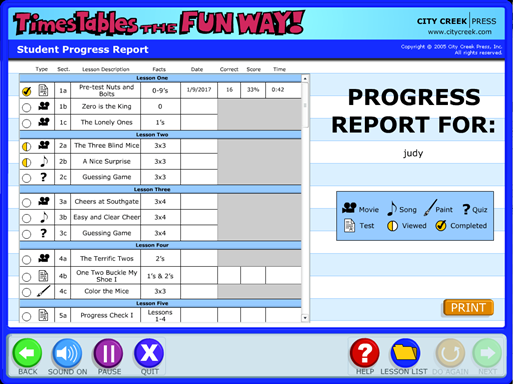
I have been using Times Alive with both my 10 year old son and 9 year old daughter. Getting started with Times Alive has been easy. It has an easy to navigate interface that also helps track progress. It’s important to note that if you do use it on multiple devices, be sure the children using it only use it on that same device. For example, my daughter was using it on the desktop while my son was using it on the laptop. If they use it on the other computer, they can still log in and do lessons, but their progress won’t be saved on that computer.
Times Tables the Fun Way {Review}
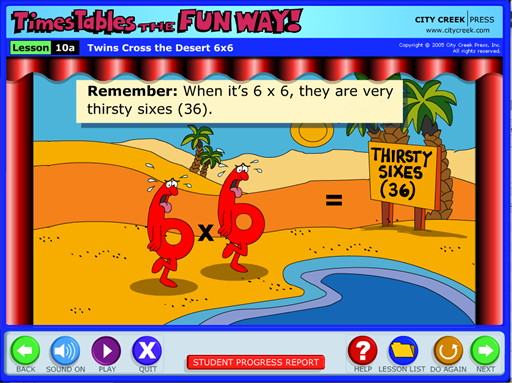
When I first told the kids they would be working on multiplication they both groaned. Since starting Times Alive, though, I haven’t heard a word of complaint again! It teaches all of the times tables through fun stories and songs. Sometimes I get complaints from my oldest about things that are taught this way because he’s “too old for it,” but he didn’t feel that way about Times Alive.
When first starting Times Alive they were given a “Pre-Test,” which did get groans from both. Neither did terribly well, and it took them a long time to finish it. As they progress, I see how quickly they go through the little Progress Check quizzes that are given every few lessons. A couple of times they noticed it threw in a few problems they hadn’t actually learned through Times Alive yet. They’d get a little hung up on them, but I was surprised how quickly they could answer the others (and get them right, too)!
Times Tables the Fun Way {Review}
Each lesson only takes a few minutes, and if you’re not paying attention, it’s easy to keep going through additional lessons without realizing it. It happened to my son, at least, when he first started it! The kids have been doing one lesson per day each week day. This is more than the suggested schedule, but they haven’t felt overwhelmed. In fact, they like doing it every day! Since we are at the beginning of our new homeschool year, we have been using Times Alive exclusively for math. I think it will make easing back into a full math easier because they will have their times tables down!

Times Alive Review

Times Alive Review
Overall, we have been loving Times Alive. It’s fun and interactive, and it’s memorable. The kids have been easily remembering their times tables, and this will definitely help them as they move on with math for our 2017 school year. They can recall them easily which is definitely which will definitely be helpful! It’s easy to access and use, the lessons are short and fun. It’s been the perfect way to teach them their times tables!

Connect with City Creek Press

Website | Facebook | YouTube

Would you like to know what other members of the Schoolhouse Review Crew thought? Check out their reviews by clicking on the banner below!
Times Tables the Fun Way {Review}
 
Crew Disclaimer
 

Our Homeschool Curriculum Picks for 2017

February 4, 2017 by Emilee Evans

Probably the question I get asked most often is “What homeschool curriculum do you use?” I have to admit, I find it amusing because I think I get asked this question from people who don’t homeschool just as often than those who do. Regardless who is asking, it’s a question that stops me in my tracks. It’s not that I don’t know what we’re using, it’s that it’s not so easy.
Homeschool Curriculum
Disclosure: This post contains affiliate links. Please refer to my Disclosure Policy for more information.
I don’t use just one curriculum. We pick and pull from all kinds of curricula. I learned a long time ago a boxed curriculum doesn’t work for us. Even having two children at the same relative grade level they don’t use all of the same curricula. It’s the beauty of homeschooling! All three of my children are unique. I love being able to tailor each child’s learning experience to their needs.
I think it’s particularly great for homeschooling special needs children because they can learn in the way that is best for them and they’re not tied down to one grade level. For example, I don’t have to hold my oldest son back in all subjects just because he’s delayed in one. He’s significantly delayed in reading and writing but only slightly delayed in other subjects. Or if they’re ahead you don’t have to hold them back like in my daughter’s case.
All that being said, it’s time to reveal our homeschool curriculum picks for 2017!

Homeschool Curriculum Picks for 2017

Our Homeschool Curriculum Picks for 2017
When planning our new homeschool year I do ask the kids how they feel about our curricula. I love getting their feedback and definitely take it into account. Of course, my oldest says he doesn’t like anything, so I kind of have to go on what he’s done well with and go from there. B and A are both at about a 4th Grade Level and C is at about a 1st Grade Level.

4th Grade Homeschool Curriculum

B – 4th Grade. He’s on the Autism Spectrum and has reading and writing challenges.

Veritas Bible – We just love this Bible curriculum. Our family uses VeritasBible.com, which has been working well for my kids. Check out our Veritas Bible Review.
IEW Primary Arts of Language – This curriculum is generally recommended for K-2, but B is still delayed in both writing and reading. PAL is also recommended for children with special needs. View our IEW Primary Arts of Language Review.
Linguistic Development through Poetry Memorization – This is another great resource from Institute for Excellence in Writing. It’s a fantastic supplement. Check out our Poetry Memorization Review.
Red Apple Reading – We’re using this as a supplement and he really likes it. It has multiple levels, and he has fun while learning. See our Red Apple Reading review.
CTC Math – We had the opportunity to review CTC Math twice, and it’s definitely been one of our favorites. View our CTC Math Review.
Times Alive – My older two kids have been learning their times tables with Times Alive and have been loving it! Stay tuned! Our review is coming soon!
Science Shepherd – This is a great online science curriculum that is faith-based. It’s easy to follow and offers hands-on projects as well. Check out our Science Shepherd review.

A – 4th Grade.

Aurora is slightly advanced. By age she would be in 3rd grade. There are some overlaps since she and B are generally at the same grade level, though she doesn’t have reading or writing delays.
Veritas Bible
Lightning Literature – This is actually a 1st Grade Curriculum, but I knew it was too advanced for my 1st Grader. We hadn’t yet finished it, and I thought it would be a good review and way to ease into our new school year. Learn more in my Lightning Literature Review.
Bible Heroes – This is the next step up from the Primary Arts of Language from the Institute for the Excellence in Writing. We will beginning this soon and will share our review shortly after! Learn more about Bible Heroes.
New American Cursive – This is another curriculum we had started but didn’t yet finish so we decided to revisit it. Plus I already got the next level! Read my New American Cursive Review.
Linguistic Development through Poetry Memorization
CTC Math
Times Alive
Science Shepherd

1st Grade Homeschool Curriculum

C has Sensory Processing Disorder and has fine motor delays as well as reading challenges. We’re going really heavy on the language arts this year, and this was actually by his request. I’m really excited about it!
Jolly Phonics and Jolly Grammar – He has just loved this and wanted to keep going, and so we are! Check out our Jolly Grammar and Jolly Phonics review.
Can Do Cubes – The Can Do Cubes really are a great hands-on resource to use alongside Jolly Phonics, but really they can be a great supplement for any grammar curriculum. Read our Can Do Cubes review.
Logic of English Foundations – C has really enjoyed Foundations and he was excited to jump back into it. We had the opportunity to review both Foundations A and Foundations B.
Eclectic Foundations – This is a curriculum we’re currently reviewing and he has been loving it! Stay tuned because the review will be coming in a couple of weeks!
CTC Math
Various Bible Activities from Twin Sisters Productions – They offer a variety of great Bible resources for young kids. C’s favorite is the Bible Story Mazes & Puzzles.

What Homeschool Curriculum are You Using?

Although this is the base of our curriculum it’s very possible we’ll make some changes through the year. Sometimes we discover something isn’t going to work from us. Because I review curricula, sometimes we end up reviewing something else that we discover is a great fit for our family and we either add it in on top of our base or we replace something. We’re kind of all over the place with our arts because it works for us!
Are you an eclectic homeschooler as well or do you use a specific curriculum? Do you have a favorite homeschool curriculum?
 

Teaching French with Middlebury Interactive Languages {Review}

October 27, 2016 by Emilee Evans

I have been teaching French to my kids on and off over the past few years. Because I studied French for so long, I thought it was only natural that I’d be teaching French to our kids! One of my favorite resources for teaching French is Middlebury Interactive Languages. Our daughter (age 8) has used their French Courses in the past. Although she wasn’t ready to move on to French II she was definitely ready to move up to the higher grade level. So, she has been using Elementary French I (Grades 3-5).
 Middlebury Interactive Languages Review
Middlebury Interactive Languages is an online language curriculum for Kindergarten through 12th Grade. They offer various languages including: French, Spanish, German and Chinese. The courses help students learn both the language and culture. Courses are offered based on both the skill level AND the grade level. This means a high school student who is just starting a new language can learn in a way that is more appropriate for their age/grade level versus the learning style that is more appropriate for a young child.
Aurora has been using the Elementary French I Program for grades 3-5 about 3-4 days per week. Last year she was doing French I for grades K-2, and they definitely take a different approach. The K-2 lessons were a little shorter and more basic. This year, she is still getting the full immersion as told through recognizable stories like “Little Red Riding Hood” as well as stories that may not be familiar to us. Each lesson takes her about 20-30 minutes to complete.
Middlebury Interactive Languages is an online account based program. To access it, we simply go to the website on one of the computers (with internet access). All of her progress is saved as she goes. When first logging in, she has the option to start where she left off or the course that is scheduled for the day. Unfortunately, there isn’t a way to change the schedule, so if they get ahead or behind, it’s definitely much easier to just choose where they left off.
Spanish, French, German or Chinese {Middlebury Interactive Languages}
There are 16 total Units for the French I (Grades 3-5) program. Each Unit starts with an Introductory video for the first lesson and is broken down into 6 total lessons. Each lesson is anywhere from 4-8 “slides.” The whole lesson can be viewed as slides on the left hand side. The lessons vary by day so on some days she may have been watching a story and participating in learning activities while other days she might be taking reviews and recording more phrases. The lessons are interactive, which I think is definitely helpful. Some of the interactive lessons she’s been doing include: listening to and then recording words and phrases, moving the correct word or phrase to the correct picture, watching stories and songs, exploring French culture and more.
Once logging on and choosing her lessons, Aurora is able to navigate the program on her own. When she completes activities they are marked off showing how many were correct. For activities that include recording words and phrases, it is marked off as complete when she is finished, and I can go in and review them. Although the program does have a “Gradebook,” I can review, it only shows the grades for things like quizzes and tests.
One feature I particularly appreciate is the “Table of Contents.” From there I can see every lesson in the course. When I click to expand the lessons, I can also see what she has completed as they are marked with a check mark. This way I can easily see if she has missed anything as well as what will be coming up!

Teaching French

Teaching French with Middlebury Interactive Languages

Overall, Middlebury Interactive Languages is still one of my favorite resources for teaching French. Although there are still a few features I would change (like being able to adjust the calendar), I love that the lessons are fun for her, and she enjoys them. I appreciate that the lessons include so many details and even include culture, which is a detail I think many other programs miss. I like that they offer lessons not only for experience level but for grade level as well so the lessons are better adapted for that age range. I definitely think it was much more appropriate for her to take French I in the Grades 3-5 level, and she has been doing great with the lessons as well!

Connect with Middlebury Interactive Languages

Website | Facebook | Twitter | Pinterest | Instagram | Google+
Members of the Homeschool Review Crew reviewed the different languages, levels and grades Middlebury Interactive Languages offers. Be sure to check out their reviews by clicking on the banner below!
Spanish, French, German or Chinese {Middlebury Interactive Languages}

Crew Disclaimer

What I Learned at my First Homeschool Convention

May 21, 2016 by Emilee Evans

I can’t believe it’s been a week since I was at the Teach Them Diligently Convention in Sandusky. What a huge blessing it was! I got to connect with some amazing people – fellow homeschoolers, fellow homeschool bloggers, amazing speakers, vendors, and the amazing organizers. How amazingly refreshing to attend a convention that not only had great connections and information, but to attend a convention that is truly faith-based and supporting and encouraging discipleship.
Disclosure: This post contains affiliate links. Please read my Disclosure Policy for more information.
The few days before (including the first day of) the Teach Them Diligently Convention, things got a little crazy for our family. So, as the procrastinator that I am, I had nothing prepared before jumping in. I had looked over the sessions, but hadn’t yet chosen any! I knew when my volunteer shifts were, but I didn’t plan around them. I definitely was learning a lot along the way!
What I Learned Homeschool Convention Tips

Homeschool Convention Tips

Here are the homeschool convention tips that were my main takeaways:

Be Prepared

Given my preface, I’m sure you could guess I was going to say this. Seriously, though, I truly wish I had gone in better prepared. Look at every session and pray over it. Perhaps you may find that a session you initially overlooked may be the session God is leading you to. Despite my unpreparedness, I do feel praying over it helped me choose a session that was just what I needed from Simply Living for Him. It was amazing.
In addition to the sessions, I highly recommend having a plan for your meals as well. Are you taking a lunch or buying? If you’re buying where are you buying from? I went to get lunch at a quick food place within Kalahari, but the time it took to walk over there and then wait in line actually took too much time. I had to head back before I could even get food because I would have been late to my volunteer shift!
I, personally, attended alone and lived within a decent driving distance, so I did not have my family with me and did not stay in the hotel, so if you do plan on staying and having your family attend, I definitely recommend fully preparing for everything with your family in mind. For example, if our 6 year old was going to be with us, I would have prepared to have my husband and the kids do something flexible mid-day when he tends to get a little tired and irritated. That way they could even go back to the room for a rest if needed.

Take a Notebook and Pen

So, at my very first session, I felt a little silly when everyone around me was taking notes, and I had nothing to take notes on (or with). Of course, I always have my iPhone handy, and even take my iPad around with me once in a while. Although I am rather efficient at taking notes digitally, I also find getting out my phone can be distracting as well. I’m totally one of those people that has a compulsive need to get rid of the little red notification circles. So having a notebook and pen would be a much better option!
<h3take a Bag

Although we received a wonderful tote at registration, it’s always possible they could run out. Then you would be left without a bag to hold all the info you’re likely to pick up. Take a bag large enough to fit paper size materials that is also easy on your hand or shoulder. This way you can easily keep your notebook, things you need throughout the day, and still have enough room to pick up additional information.

Know Your Budget

Oh my goodness. Can I just say the Vendor Hall is amazing and overwhelming at the same time? Wow! If you don’t have a set budget going into it, it could be very easy to spend more than you intend to. The deals that are offered specifically at the convention are amazing and very hard to pass up. I can definitely say this first hand because thanks to some major dental work I had I had a budget of basically nothing. It was so, so hard to say “no” to all those things I thought we need.
After returning home and looking over all the information I picked up, there definitely were still some things that I do believe would have been a wise purchase (if budget allowed), but others I realized probably wouldn’t have been such a wise investment. Don’t be hasty to buy right when you see things. Take your time and visit vendors multiple times, then take a mental break to write everything down, the costs, and how you would integrate it in your homeschool. This will give you a snapshot of what you can and should buy as well as what you can’t or shouldn’t buy!

Volunteer

There are a variety of volunteer opportunities. There is the option to volunteer directly with Teach Them Diligently as well as some of the various vendors. Volunteer shifts are usually brief (2 hours at a time, for example, with 4-6 hours total) and either allow for free registration or offer monetary compensation.
If that alone isn’t enough, though, I actually have to say, it’s a great way to connect with others. I am most definitely an introvert. Put me in a room with 2-3 people and tell me to start up a conversation, and I’m stumbling over words. Put me in front of a lot of people, and I’m all kinds of chatty. I just love to help people, and volunteering put me in a position to do so. Essentially, it gave me a reason to talk to people! It was a great way to connect with the other vendors as well!
I cannot express enough how amazingly blessed I was by the Teach Them Diligently Convention. The fact that it is Gospel centered was a huge blessing, and I love that I connected with so many people. I saw people who live nearby that I see on a regular basis and got to connect with those I have only connected with online or those I only see once in a long while when we happen to be at the same event.
As someone who has been homeschooling for around 6 years now I have to say I definitely wish I had gone sooner. Now I will be waiting eagerly to go back to Teach Them Diligently in 2017! What are some of your favorite homeschool convention tips?
Here are some other great testimonials!
Testimonials Page
 
Have you heard of Homeschool Launch? It’s a great resource by Teach Them Diligently!
Homeschool Launch 2016
 

Next Page »

Recent Posts

  • Blog Under Construction
  • How to Manage (and Use) all Those Pictures of Your Kids
  • Castaway Bay Getaway for Family Fun
  • 5 Winner Utzy Naturals Allurtica Seasonal Relief Giveaway! $262 TRV Giveaway!
  • Spend the Day at Castaway Bay {Enter to Win 4 Day Passes!}

Recent Comments

  • catofashions coupons on Affordable Women's Fashion and Accessories
  • Happy Hiller on Keep Your Home Connected with Netgear Arlo Smart Home from Best Buy
  • Pencil Sketch Drawing on Learn to Draw a Cat {Drawing Tutorial}
  • fast apps apk on Learn to Draw a Cat {Drawing Tutorial}
  • strobe light on Learn to Draw a Cat {Drawing Tutorial}

Archive

Categories

Meta

  • Log in
  • Entries feed
  • Comments feed
  • WordPress.org

Copyright © 2026 · Beautiful Pro Theme on Genesis Framework · WordPress · Log in