Pea of Sweetness

  • Home
  • My Shop
  • About Us
    • About Emilee & Pea of Sweetness
    • Awards
    • Contact Us
    • Disclosure Policy
    • Privacy Policy
  • Work with Me
    • PR Information & Media Kit
    • Sponsor/Advertising Info
    • Sponsorship Opportunties
  • Proudly Part Of
  • Blogs I Enjoy
  • Faith
  • Family
    • Parenting
      • Parenting Special Needs Children
    • Pets
  • Homeschooling
    • Homeschool Reviews
      • Preschool Reviews
    • Homeschooling Special Needs Children
    • 5 Days of Tips for Homeschool Parents
  • Homemaking
    • Meal Planning
    • Recipes
  • Special Needs
    • Autism
    • Sensory Processing Disorder
    • Cancer
  • Natural/Eco-friendly Living
    • Natural/Eco-friendly products
  • Health & Fitness
    • Health and Fitness
    • Wellness Wednesday
  • Reviews & Giveaways
    • Current Giveaways
    • Giveaway Linky
    • Reviews
    • Winners
    • Blogger Opps
  • Travel
    • Ohio Attractions
    • Ohio Events

Talking Fingers Review

April 15, 2016 by Emilee Evans

Due to our oldest son’s special needs he has had challenges with reading so although he is 9 and Read, Write & Type is geared for K-2, I knew this was something that would be ideal for him to try! This program from Talking Fingers Inc. covers spelling, phonics, reading and typing. It has special features for those that have reading difficulties as well as learning disabilities and even English as a second language.
Talking Fingers Review Read Write Type

Talking Fingers Review

For our Talking Fingers Review we received a one-year subscription to Read, Write & Type. It is accessed online, and all account information is saved online, so it can be accessed from anywhere, and you can pick up right where you are. We’ve used it on both a Windows PC and Windows Laptop with Windows 10, and everything has run well. Students and parents each have their own account log-ins.
In the parent dashboard I have access to add students as well as manage our account. There is a User Manual which was helpful for getting everything set up for our son. There is also an Administrator Guide, which seems it would be most helpful for those that will have more than one Administrator and students. We only needed one Administrator, of course.
From the parent dashboard I can also edit settings for Brayden. I can choose the times and days he is allowed to log in as well as the pass level. The pass level is set at a default of 70%, which I’ve kept. If he were to fall below the 70% it would send them back to previous games to practice and improve those skills. Each setting has a little “?” beside it that you can hover over to learn more about what that setting is or does.
Talking Fingers Review Parent Dashboard
When the student logs on to their account, it goes straight to a start screen. I found this to be a little confusing because I have used many online programs that have a student dashboard as well. I felt like I was doing something wrong, but that is the only screen it goes to and there aren’t any other options. So, now we just know and click Start. It starts with a fun, exciting song for a fun introduction.
I do find the student area to be a bit confusing. There are different things to click on, but it isn’t really intuitive. There is a little box with a star on it as well as letters they have finished that can be clicked on where we can see and print out his certificates. I believe you have to be logged in to the student’s account to view and print the certificates because I haven’t found this option in the parent dashboard, and I’m glad we found it on his account! The certificates are really easy to print as you just have to click on the printer icon.
Talking Fingers Review Student
Brayden has been learning how to type while also learning to spell. Typing is taught using the correct fingers and style. Letter sounds are emphasized as well, which I think would be perfect for younger kids. If your child does need to jump ahead, it can be adjusted in the parent area. I debated doing this but wanted to get a feel for the program first, so he’s been working on it from the beginning, which I actually think is good for him so he can learn how to type correctly.
Overall, I do feel this is a good program for beginning and struggling readers. I do find that both the parent and student areas are tricky to navigate, and there is a learning curve until you get used to the setup. Brayden has really been liking the program, and each lesson can be finished in less than 10 minutes. Generally we only do one lesson per day, but he could easily do two or even three at one time.
Get Connected with Talking Fingers
Website | Facebook | Twitter | YouTube
I can’t personally attest for the ESL component of Read, Write & Type, but many different members of the Schoolhouse Review Crew reviewed it. They have been using it with different age children as well! Be sure to check out their reviews by clicking on the button below!

Talking Fingers Inc. Review
 
Crew Disclaimer
 

IEW Primary Arts of Language Review

June 12, 2015 by Emilee Evans

Disclosure: This post contains affiliate links. For more information please refer to my Disclosure Policy.
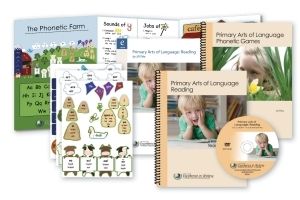
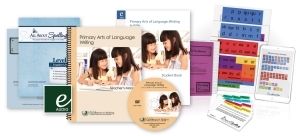
Because of our kids’ special needs, teaching reading and writing has always been a challenge. We have experienced periods of advancement as well as regression. I had been intrigued by everything the Institute for Excellence in Writing (IEW) has to offer and was thrilled for the chance to review the Primary Arts of Language: Reading Complete Package and Primary Arts of Language: Writing Complete Package.
IEW Review
What really impressed me even more about IEW is their heart for special learners. Seeing how their programs have helped special needs learners was really encouraging, and I couldn’t wait to jump in when we received our PAL packages!
IEW Review
Before jumping in, though, I watched the included DVD-ROM’s, which I found extremely helpful in determining how to start, how to specifically use the teacher guides, how to set up the games, etc. They are long, so on the first day, I only watched the videos and proceeded to start with the program the next day. Although you could guess your way through without them, I highly recommend watching them because I feel like I was able to start quickly and seamlessly because of them.
Plus, they contain the worksheets needed for the program. I chose to print out the full first set of worksheets right at that time so they would be readily available, though you could opt to print the worksheets as needed. The only downfall I see of the DVD-ROM is more and more new computers (particularly laptops and MAC computers) no longer have a DVD drive. My laptop does not, but luckily my husband’s computer does. There is an option to order the printed materials, though. The DVD-ROM’s also include bonus MP3’s.
IEW Review
Although the Reading and Writing packages are separate packages, they are designed to fully complement each other. Each program has its own Teaching Manual, DVD-ROM, and materials, which I will discuss further in my review. In fact, when working on a schedule, a recommended schedule is included right off the bat in the PAL Reading Teacher’s Manual. The recommended schedule naturally works in the Writing program as well, and we even find we bounce back and forth between the two throughout the day.
The suggested schedule also recommends suggested breaks, which are perfect for working on other subjects. I found this schedule worked really well for us, so I wrote it on our task board so I could easily refer to it rather than flipping to that page each time. We use the first break for Math and the second break for Art and/or Science, and it has really helped our day flow. Although our kids have really been enjoying PAL, breaking up reading and writing is good for them because they tire easily.
Primary Arts of Language Review - Schedule
We have been using PAL Reading and Writing with both our older children who are ages 9 and 7. Our 9 year old son is on the Autism Spectrum. He continues to struggle with learning to read and although is at the late 2nd Grade level for most subjects, he is reading at a 1st Grade level. He has fine motor delays, so writing is also a challenge. His hands get tired easily, and writing just doesn’t come easily to him overall.
Our 7 year old daughter has ADHD and Sensory Processing Disorder. Although she is starting to progress in reading, writing is still a big challenge as she also has fine motor delays. Holding the pencil correctly is her biggest challenge as she tends to hold it with her outer fingers. We find she does still struggle with writing letters backwards as well.
Despite their ages and even their abilities at this point, we decided to start both the Reading and Writing at the very beginning. They definitely know their letters, but we chose to do this for two reasons. The first reason is that not starting at the beginning is a big hang-up for them – particularly our son. He has a hard time starting anywhere but the beginning.
The other reason is that they both really need to correct their pencil grip, which is something you may have seen I resisted in the past. I was even told not to do it at one point (particularly with our daughter since she was writing well, just incorrectly), but when I really thought about it and read the importance of it, I realized this isn’t something we should let slip. I knew this was the time to get it right.
IEW Primary Arts of Language Review
The benefit of having two Teacher’s Manuals (one for each program) is that you could start writing on the necessary level and reading on a different level. I love that this program makes that possible, and I think it’s the perfect solution for children who are further ahead in one subject or the other, but because of hang-ups and deciding you never can have too much practice, I just decided it was best for us to start both at the beginning.

A Breakdown of the Schedule

My writing in the picture may be hard to read, but I want to further breakdown the schedule to give you an idea of what the “typical day” looks like. I will also note if it is in the Reading or Writing program

  • Poetry. (Reading) 5-10 minutes. In Poetry, we read a poem and then usually stop to pick out several “letter helpers.” This helps tie in what we will be learning later in the day, and the repetition has been very helpful in general.
  • Class Journal. (Writing) 5-10 minutes. In our Class Journal, each child has their own journal (we just use a simple, spiral bound notebook), and we write the date at the top and write one sentence about our day (or weekend). At the beginning it’s noted that the parent writes the entry, but because our children are able to do copy work, I write it on the board and have them copy it to their journal, which is why I only have them write one sentence. I emphasize punctuation, and we read our previous entries.
  • Primary Arts of Language Review Journal

  • Priting/Copy Work. (Writing) 15 minutes. Because we are still in the beginning, our printing consists of individual letters. The letters are emphasized by their sound and not the letter name. Each letter has a unique name by which to remember it. Ex: K is the “kicking letter.” This has been a fun way to go over the letter sounds, and I found even our 5 year old likes to come over and learn the sounds! The kids practice writing the letters in their notebooks, though if your children aren’t writing at all yet, there are a myriad of suggestions for learning to write the letters. For our children, it’s more of a review, but writing them properly.
  • Primary Arts of Language Review Writing

  • Read a Story. (Writing) 20 minutes. I admit, I was surprised this is in the Writing program, but it offers a break from the writing and goes into detail about the Story Sequence. Story Sequence is something we’ve attempted but struggled with in the past, but in this program it’s introduced slowly, step-by-step, and although our kids do still struggle with the concepts, I can use the ideas to guide them and prompt them. We have seen major improvement in their fully understanding and even being able to tell the story back! This is a big accomplishment!
  • Break/Other Subjects.
  • Foundations and Reader Words. (Reading) 15 minutes. This is where I teach letters, phonics, and site words using games. All game boards and pieces are provided in the PAL: Phonetic Games book (included in the Reading Package). Game boards are generally cut out and pasted to file folders, which make them easy to store and easy to find and get out. Our kids like to do them independently as well, so it is great that they’re easily stored and found.
    Game pieces can simply be paper clipped to their game board. I simply cut out the needed game pieces the day they are needed, which means I have to allow for a little prep time before we begin our day, but it only takes a few minutes. The kids really enjoy the game style learning, and even our 5 year old has gotten in on the games and is better learning his letter sounds as well! He also has special needs, so I love this! Their favorite game so far is Mugs! They love feeding him bones while I say the letter sound!
  • Primary Arts of Language Review MUGS

  • Phonetic Farm. The Phonetic Farm is included in the Foundations and Reader Words, but I wanted to give it a separate mention. It contains its own folder with a farm background and stickers. We find the sticker for the helper letters we learned that day and add them to the farm. Helper letters include letter combinations like “er,” “ee,” “ow,” “ck,” etc. They fit in to the farm by relating to that area. For example, the “ow” at the end of words like “yellow” and “grow” goes into the Silo, which will eventually contain all helper letters that make the long “o” sound. It’s really a unique and fun idea!
  • Primary Arts of Language Review Phonetic Farm

  • Agenda or Work Period. (Reading) About 30 minutes. The Agenda or Work Period is where we use the worksheets we printed out from the DVD-ROM. It’s almost an independent work time, though I always stay close by to help. I use picture cards to show what they are expected to complete during the Agenda or Work Period and explain the instructions for any worksheets they will be doing. After they finish they put their worksheet in my “Teacher’s Mailbox.” I really like that this gives them independent work time and helps them to understand staying on task. The worksheets go along with what we’re learning that day.
  • Break/Other Subjects.
  • Phonetic Farm Tour. (Reading) 5 minutes. This is where we get back out the Phonetic Farm and go over all of the letter helpers we’ve learned so far. I encourage them to say the sounds and even read the words if they can.
  • Read Words/Sentences. (Reading) 5 minutes. This activity varies between sometimes having them read one letter and thinking of ideas that start with that letter to reading pre-printed words/sentences. It is a nice review of what we’ve been learning.
  • Informal Spelling Test. (Writing) 5 minutes. In the informal spelling test, I say the letter sound (eventually it will be words), and they write it down. It is recommended to have them write on the white board, but because writing letters is more of a review, we’ve been doing it on notebook paper.

The PAL also includes the All About Spelling Basic Interactive Kit and All About Spelling Level 1. The All About Spelling can be started at any time, but if you are following the program specifically as it is laid out, it is introduced in Part II of the Writing Program, which is after Lesson 31. I was hoping to get an early start but because of the fact that our kids are working so hard on correcting their pencil grip, I wanted to follow the program exactly to give them time to work up to the spelling.
The All About Spelling Level 1 includes the Teacher Manual and the Student Pack. The All About Spelling Basic Interactive Kit includes Letter Tiles, Magnets, and Divider Cards. It’s recommended to use a recipe box for the cards and a magnetic white board.
Primary Arts of Language Review AAS
Overall, I am so happy with the progress our children have been making since starting the Primary Arts of Language: Reading and Writing programs. Our daughter is reading even more and is extremely motivated to try to read everything, and our son is really starting to come out of his shell with reading. He’s starting to express interest in trying to read little books, which is very exciting!
Both children are also making progress in writing, and I find I’m not having to remind them as often to check their pencil grip! I think our son now also fully grasps the importance of writing correctly, which is something he’s resisted simply because it is challenging for him. I think it is a great program for special needs children who have similar struggles.
Be sure to connect with the Institute of Excellence in Writing on Facebook, Twitter, Pinterest, Google+, YouTube and Vimeo. Also be sure to check out and follow the IEW Blog!
Members of the Schoolhouse Review Crew reviewed a variety of products from the Institute of Excellence in Writing from those with special needs with beginning skills to learners without challenges up to Grade 12! Learn more and check out their reviews by clicking on the banner below!
IEW Review
 
Crew Disclaimer
 

Kids Have Fun Learning to Read with Red Apple Reading

November 11, 2014 by Emilee Evans


Having young readers, we are always on the lookout for reading programs that encourage them in their path of learning to read. Reading is a challenge for our children due to their special needs, so a program that is encouraging and fun is extremely helpful! As a homeschooling mom, I’m always looking for great resources to add to our curricula!
Disclosure: We received a subscription to Read Apple Reading to facilitate our review. Regardless, all opinions are my own and those of my family.
Red Apple Reading
Red Apple Reading is a fun online reading program for children ages 4-9. It teaches fundamental reading skills in a way children love – with fun graphics and animated videos and games! It has characters kids love and encourages them to learn by offering a map-based scenario. As they learn they get to advance on the map! Because our kids our so visual, they love this! They are encouraged to complete lessons so they can move to the next spot on the map!
We have been using Red Apple Reading with our 6 year old and 8 year old. When setting up the account I was able to select their grade level. What I appreciate, though, is they are not bound to this grade level. This is a major advantage in our case because our kids aren’t necessarily reading at their “grade level.”
Each child has their own log-in, and I have a separate log-in as well for the parent dashboard. I found so much helpful information in the dashboard including a description of each level. I wasn’t really sure where to have them start because there are three levels (well, currently two, but there will be three soon!), and I wasn’t sure what the breakdown was. It not only gave me a guide for the suggest grade range for each level in the User Guide, but I could also access full Lesson Details as well. This helped me determine exactly where they should be!
Red Apple Reading Levels
Our 6 year old started at Level B, which is ideal for Kindergarten to 1st grade, Ages 4-7. She is actually a little above this level, but after trying Level C she really felt more comfortable with Level B. Because I want to be sure she is not feeling overwhelmed, I agreed this was the best choice. If she is worrying, she’s not learning! Level B focuses on Phonics, sight words, short vowels, word families, and the ABC Tree.
The theme of Level B is Park Planet, and it is actually split into 2 parts. There are 50 Phonics and Sight Word Lessons and 26 ABC Lessons at the ABC Tree. The map looks like a park and has fun animal characters!
Although our 8 year old is around the same reading level as our daughter, he really wanted to challenge himself and start with Level C, which is ideal for 1st to 3rd grade, Ages 6-9. He particularly loves the theme of Level C, which is Island Adventure, which means pirates! Level C covers Advanced phonics, sight words, vocabulary, and reading comprehension.
Level A will be coming soon and will be ideal for Pre-K to Kindergarten, Ages 3-5. I can’t wait for our 4 year old to be able to jump in on Red Apple Reading as well! He already loves watching his older siblings use it, and I can tell he is eager to begin as well!
I can’t say enough good things about the parent dashboard. There are so many helpful resources including quite a few downloadable resources!
Red Apple Reading Downloadable Resources
Plus, in the dashboard I can check each child’s progress, update our information, and easily access the download links to the apps as well! Yes, there are apps! We can access Level B and Level C lessons on my iPhone! The Apps are free with your account and can be used on multiple devices. We haven’t used the apps much, though, because we recently got a 2nd computer, which has helped make computer time accessible for both kids at the same time!
Overall, our kids are loving Red Apple Reading. They are progressing well and are having fun! They get to learn at their own pace and are encouraged by fun characters, a map to track their progress, and they feel like they’re playing games! I have enjoyed watching them because I just love when they have so much fun when they’re learning!
Red Apple Reading Review

For More Information:

Visit the Red Apple Reading Website
Connect with Red Apple Reading on Facebook, Twitter, Pinterest and YouTube

*Giveaway!!!*

Would you like to win unlimited access to Red Apple Reading for up to 3 children? This is a $149 value! This giveaway runs through 11/13/14 at 10pm Central Time and is open to US and Canada ages 18+. Enter the giveaway now!!
 
I received one or more of the products mentioned above for free using Tomoson.com. Regardless, I only recommend products or services I use personally and believe will be good for my readers.

Helping Our Kids Learn to Read with Essential Skills Advantage {Review}

August 28, 2014 by Emilee Evans

Essential Skills Advantage ReviewWe have a preschooler (age 4) taking an interest in learning to read as well as a 6 year old and 8 year old that are beginning readers. We were excited for the chance to review Essential Skills Advantage. It is a proven online reading and language learning program for grades K-6 that was developed by highly experienced teachers.
What I found most intriguing and unique about Essential Skills Advantage is that instead of focusing on one specific area such as phonics or sight words, it addresses all of it. The name “essential skills” is really descriptive of what it is – it teaches all of the essential skills needed for children to learn to read. Plus, it does so in a way that is fun and appealing to kids!
We have been using Essential Skills Advantage with all three of our children, but mainly with our older two children who are reading between the 1st and 2nd Grade levels. They have had a hard time learning to read due to their special needs, and finding resources that are helpful and appealing to them is always an advantage, and they have really taken off with Essential Skills Advantage! They have both been doing the lessons at the second grade level, and it has become our main reading curriculum. We use it 4-5 times per week. Sometimes we do just one lesson per day, and other days we do up to 4 or 5 depending on the lesson.
Essential Skills Advantage Review
Essential Skills Advantage has been great for our kids in so many ways. It is definitely visually appealing. It also has fun sounds. It always has a background sound of crickets, which is nice for helping them to just have a calmness while they are working.
Although our youngest is only preschool age, he has really been showing an interest in reading, so although Essential Skills Advantage begins at the Kindergarten level, I wanted to see if he would be able to learn some at the Kindergarten level, and I am glad I did because he has not only been learning, but he has been loving it! He asks if he can do his lessons! There is just something extra special when your children are enjoying the learning experience!
Essential Skills Advantage is unique in that I first have to log in to my parent account to do anything else. From my account there are SO many options. I can choose any of the Complete Reading programs for any of the grades (K-3) as well as access the Activity Guides for each, Fun With Spelling 1-3, Reading Comprehension 4-6, Vocabulary Builder 4-6, Spell Master Grade 6, Spell Master Grade 5, Spell Master Grade 4, Grammar Grades 3-5, Spelling Stumpers 1-5, and Spelling Stumpers 5-9. A lot of options, right?
The bulk of the program (and what we use most) is the Complete Reading Program. As I mentioned, we use Kindergarten for our Preschooler and Grade 2 for our 2nd Graders. It really is a full program. The 2nd Grade program has over 1500 activities and is designed to give students all the reading and language skills they need by the end of 2nd Grade. The targeted skills are: Phonics, Sight Word Recognition, Grammar, Language, Reading Comprehension, and Spelling. Our kids have been doing a variety of activities from matching, typing, coloring (virtually), and more. Activities are repetitive yet fresh at the same time. For example, they will be working on the same vowel sound, but the activities they will be doing revolving around those sounds are completely different. It has really been a great approach for our kids.
Essential Skills Advantage Review
Something else I think is appealing about Essential Skills Advantage is that some of the activities feel like games to the kids. They know it is school, and they are definitely learning, but they are having fun as well. Because reading has been challenging for them, usually when I say “it’s time to work on reading” I get groans and pouts, but now I get “can I do the butterfly one?” Yes, the “butterfly one” is Essential Skills Advantage.
Overall, I am thrilled with Essential Skills Advantage. The kids are making amazing progress, and they are truly enjoying the process! Those are the homeschooling moments that are so rewarding, and I am so glad we got to review Essential Skills Advantage.
Essential Skills Advantage has started to offer a sponsored version of their program that is completely free. You can sign-up completely free at www.ESAlearning.com. Members can enjoy access to every course Essential Skills Advantage has to offer with sponsored advertising and some limited features. The Premium Plan is available for $9.99/month per child and offers additional features.

*Amazing Deal!!!*

Right now, through October 1st, you can sign-up for the Essential Skills Advantage Premium Plan for 50% off! The best part is the 50% discount will apply as long as you remain a member. The membership fee will be reduced to only $4.99/month/student! To take advantage of this amazing deal you must sign up using code TOS50.
Be sure to connect with Essential Skills Advantage on Facebook, Twitter, Pinterest and Google+.
Members of the Schoolhouse Review Crew with children of multiple ages shared their reviews of Essential Skills Advantage as well. See what they thought by clicking on the button below!
Click to read Crew Reviews
 
Crew Disclaimer
 

« Previous Page
Next Page »

Recent Posts

  • Blog Under Construction
  • How to Manage (and Use) all Those Pictures of Your Kids
  • Castaway Bay Getaway for Family Fun
  • 5 Winner Utzy Naturals Allurtica Seasonal Relief Giveaway! $262 TRV Giveaway!
  • Spend the Day at Castaway Bay {Enter to Win 4 Day Passes!}

Recent Comments

  • catofashions coupons on Affordable Women's Fashion and Accessories
  • Happy Hiller on Keep Your Home Connected with Netgear Arlo Smart Home from Best Buy
  • Pencil Sketch Drawing on Learn to Draw a Cat {Drawing Tutorial}
  • fast apps apk on Learn to Draw a Cat {Drawing Tutorial}
  • strobe light on Learn to Draw a Cat {Drawing Tutorial}

Archive

Categories

Meta

  • Log in
  • Entries feed
  • Comments feed
  • WordPress.org

Copyright © 2026 · Beautiful Pro Theme on Genesis Framework · WordPress · Log in