Pea of Sweetness

  • Home
  • My Shop
  • About Us
    • About Emilee & Pea of Sweetness
    • Awards
    • Contact Us
    • Disclosure Policy
    • Privacy Policy
  • Work with Me
    • PR Information & Media Kit
    • Sponsor/Advertising Info
    • Sponsorship Opportunties
  • Proudly Part Of
  • Blogs I Enjoy
  • Faith
  • Family
    • Parenting
      • Parenting Special Needs Children
    • Pets
  • Homeschooling
    • Homeschool Reviews
      • Preschool Reviews
    • Homeschooling Special Needs Children
    • 5 Days of Tips for Homeschool Parents
  • Homemaking
    • Meal Planning
    • Recipes
  • Special Needs
    • Autism
    • Sensory Processing Disorder
    • Cancer
  • Natural/Eco-friendly Living
    • Natural/Eco-friendly products
  • Health & Fitness
    • Health and Fitness
    • Wellness Wednesday
  • Reviews & Giveaways
    • Current Giveaways
    • Giveaway Linky
    • Reviews
    • Winners
    • Blogger Opps
  • Travel
    • Ohio Attractions
    • Ohio Events

Learning the Bible in a Fun and Interactive Way {Veritas Press Review}

June 29, 2016 by Emilee Evans

Our kids definitely learn best when they are having fun. Recently, they have been learning the Bible in a way that is fun and interactive with VeritasBible.com. This homeschool Bible curriculum from Veritas Press has been a great addition to our homeschool curriculum.

Old and New Testament Online Self-Paced Bible Veritas Review
VeritasBible.com is an online Bible curriculum that allows kids to progress through their Bible learning at their own pace. All of the account information is saved into a single account for the whole family. It can be easily accessed online by signing in with your account information. Although there is only one account for the family, the kids still have their own separate accounts where their progress is saved. They simply choose their account from the main menu. When setting up children’s accounts, they can each be assigned a specific avatar to represent them.
I originally started an account for all three children but quickly discovered it is too advanced for our youngest son who is only 6. Even our 10 year old had some challenges as many activities required reading, and he is a delayed reader. So I would sit with him as he does it so I can help him with the reading when answering questions. Our 8 year old is also working through VeritasBible.com and is able to do so independently.
Veritas Bible Review Curriculum
VeritasBible.com offers three courses: Genesis to Joshua, The Gospels, and Judges to Kings. Both of our kids opted to start at the beginning with Genesis to Joshua. All three courses cover 32 events in the Bible, and they are not dependent on each other. If your child chooses to start with The Gospels instead of Genesis to Joshua, for example, they will be able to do so without challenges. We’re just a very “by the book” family and love to follow things in an exact order. I wasn’t surprised they both chose to start at the beginning!
To get started, they choose and click on their course. They are then taken to a screen that is similar to a map. It marks a path and shows where they’ve been as well as how many stars they’ve earned in a lesson. Certain lessons award stars based on their understanding and completion of quiz-like questions. This is where I need to help our oldest because they require reading. Although overall scores or grades are not given, they do have to receive at least one star to continue. Even though our children started at the same time, they are at different places on their path due to this. I like that this encourages and confirms understanding before proceeding.

Veritas Bible Review

VeritasBible.com Bible Curriculum Review
Our kids have really been enjoying VeritasBible.com. Lessons are presented in a way that is fun and enjoyable. They watch videos acted out in a fun way, learn music to help memorize events and do activities, projects, and worksheets in addition to the tests. They get to explore activities in a variety of ways which even includes activities in art, music, and geography.
They really seem to be doing well with this approach, and although our oldest son is progressing a little more slowly due to his special needs, I can tell he really is learning the Bible and doing so in a whole new way. Our daughter logs in and finishes her lessons before I even ask her! She can easily log in and complete the lessons by herself! The overall lesson times vary based on which lesson it is, but they generally seem to be between 30 and 45 minutes.
I love that they have been learning the Bible in a way that is fun and engaging. They have been going beyond just learning and hearing Bible stories to truly knowing them. I appreciate that they are challenged to have an understanding of them before proceeding. Of course, I love that they are enjoying it!

Get Connected with Veritas Press

Website | Facebook | Twitter | Pinterest | Instagram
Other members of the Schoolhouse Review Crew have been using VeritasBible.com with their families as well as Veritas Press Self-Paced Bible. Learn more and see what they thought by clicking on the banner below.
Old and New Testament Online Self-Paced Bible Veritas Review
 
Crew Disclaimer
 

My School Year (Homeschool Record Keeping) Review

June 24, 2016 by Emilee Evans

Something that tends to get a lot of buzz in the homeschool community is keeping records. Everybody has different homeschool styles as well as ways of planning and keeping records. Even so, everybody needs needs it! My School Year (Homeschool Record Keeping) from MySchoolYear.com offers online homeschool record keeping designed to make it easy regardless of style!
My School Year Homeschool Record Keeping Review logo
Recently we’ve been using My School Year (Homeschool Record Keeping) to track our own homeschool. We are just over half way through our homeschool year, and this is around the time I become more forgetful and generally unorganized. Making sure we have a plan for our homeschool is so important. Otherwise, I’d very likely forget! This tool for homeschool record keeping can be accessed on multiple devices with internet access. So no matter where you are you can take a look at your homeschool plans!
I, personally, have been using it on my laptop using the Google Chrome browser as well as my iPhone using the Safari browser. At first I was nervous that it would be a little more difficult to access on my phone since I was doing so through the browser rather than an app. I am impressed, though, by how mobile responsive their website is! I can easily access our account and use all of the available features.
My School Year Homeschool Record Keeping Mobile
It has an abundance of features including:

  • Attendance
  • Events
  • Extra Curricular Activities
  • Lesson Plans
  • Report Cards
  • Reading Log
  • Standardized Tests
  • Transcripts 
  • And More!

My School Year (Homeschool Record Keeping) is designed to keep everything central. All of the kids are added to the account and can be edited, reviewed, etc. right from within our “Homeroom.” There are no additional log-ins or a need for separate accounts. In our Homeroom all of the kids’ names are displayed, and I can click on one to show their exact information. To make it even easier, once I have selected their name I can click and “Jump To” a specific area rather than scrolling all the way down.
Mobile Homeschool Record Keeping My School Year
I find the site to be very easy to navigate. I feel like I can easily get to and see, edit, etc. what I’m needing quickly. To get started I set up our homeschool. I started by adding each child. I looked at the Subjects, but they provided the necessary basic subjects, so I didn’t have to edit anything.
I then added our school year. It notes to add a “Term,” which I’m assuming are breakdowns of the school year. We don’t really do this, so I just added our whole year in one “Term.” From there I can see my start and end dates, how many days are in our school year, scheduled days off, and our actual school days. Our school year is long so we can take breaks as needed, but since we were just getting started, I didn’t add in the scheduled days off yet. This will definitely help to plan things better as the days come up!
Terms My School Year Online Record Keeping
Having the correct school days can also help with tracking attendance, though you can also track each child’s attendance individually on their dashboard. At any time, I can also easily access each child’s dashboard from a drop down in the header. Editing attendance is easy, and you can even make note of half days!
After everybody was set up, it was time to add classes! It is very simple to add classes. Under each child’s name in the drop down, I select “Classes,” which takes me directly to their list of classes. From there, I simply click “+ New Class,” and I’m there! In there parents can add the name, select the Subject, the school days and times. It also offers the option to view and edit other settings. It’s all right there!
My School Year Classes Homeschool Record Keeping
I, personally, would be content with those features alone, but as our kids get older I am finding I really do (and should) keep track of all of the important details. Here in Ohio we do have to send a Notice of Intent each year, and it has to list our plans and curriculum (though we’re not bound by it). Now I no longer have to do all this. I can actually make a print out of this for each student right there from my reports! There is even an option to print out a Transcript.
There are quite a few other more detailed features that I am not yet using for our homeschool, but I know many homeschoolers really appreciate them, and I know I will too later! One feature I find really intriguing is the Lesson Planning. There are so many options for actually planning your homeschool year as well. I tend to keep it simple. I just fill in all the classes and don’t narrow it down to lessons. Again, though, I know this is something I will want to do more of in the future, so I know it’s a great resource!

My School Year (Homeschool Record Keeping)

My School Year Homeschool Record Keeping Review
Overall, I find My School Year (Homeschool Record Keeping) to be a thorough homeschool record keeping tool with ease of use. I love that it can be accessed anywhere from multiple devices. It has great detailed features for tracking all the various aspects of homeschooling.

Connect with MySchoolYear.com

Website | Facebook | Twitter | Google+
Many members of the Schoolhouse Review Crew had the chance to review My School Year (Homeschool Record Keeping) in their own homeschools. They have different styles, ages of children, different needs, etc., so you should definitely check them out by clicking the banner below!
Homeschool Record Keeping {MySchoolYear.com Review}
 
Crew Disclaimer
 

LearnBop Online Math Review

June 23, 2016 by Emilee Evans

We’re currently just over halfway through our school year (we start in January), and we’ve had a touch and go year with Math. It seems some concepts the kids have really caught on quickly while others have been more challenging. Recently our older two children (ages 8 and 10) have been getting math help through LearnBop. We were given a 12 month subscription to LearnBop for Families to facilitate our review.
LearnBop for Families Review
LearnBop has been available for schools for some time but had recently introduced LearnBop for Families. It is an online Math Tutor for grades 3-12. On their website it notes “it doesn’t just test a child’s ability to do math, it teaches them to solve problems as an expert math teacher would.” That’s what most of us need, right? Math can be tricky, and having a resource to help children learn to solve math problems is definitely helpful!
LearnBop for Families is accessed solely online. It can be accessed anywhere you can connect to the internet. Each child is provided with their own login information and account. No matter where they are they can access their information, and it is always saved. It provides a learning path that is ideal for each child. Parents can further alter this learning path if they feel it is needed. It helps identify and close learning gaps.

LearnBop Online Math Review

LearnBop for Families Review
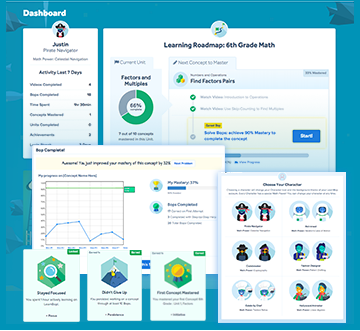
Our kids have been using LearnBop 4-5 times per week to supplement our Math curriculum to fill in those gaps. The first log in often determines their attitude for an online program. LearnBop allowed them to choose a fun avatar. Brayden chose a Pirate Navigator and Aurora chose a Fashion Designer. They were definitely options they haven’t had before, so they really liked that! Both of them have been following the recommended 3rd Grade Roadmap. I didn’t explore additional options as this Roadmap was just what they were needing!
It notes the steps that need to be taken to complete each Unit Concept, but I didn’t find the flow to be intuitive. The kids would log on, and wouldn’t be too sure exactly what they should do that day. I wasn’t quite sure either. As with anything, though, I encourage learning at their pace, so we fell into a routine that worked for them.
Units are broken down into videos. There are required videos as well as additional optional videos. Unfortunately, our older son likes to do things in exact order. He was moving through the first concept very slowly as he continued to watch multiple videos and not starting any bops. Once I was able to convey they are optional, he was able to move on. In order to complete the Unit, they must meet 90% mastery on their bops.
LearnBop Online Math Review
Additionally, I have my own login as a parent where I can monitor each of their progress. I can see what they’ve completed, what their next step is, what they need to reach mastery for that Unit, their achievements and more. I have found using my dashboard regularly also helped me get a feel for the flow and help guide them to their progression.
Overall, I think LearnBop is a nice online math program. Although it wasn’t intuitive for us at first, we were able to fall into a routine that worked for us. I appreciate that it’s not just asking them to answer math problems but to really learn to solve them. I think that is exactly what they’ve been missing! I do like that there are additional videos for each unit as needed because they do come in handy with the concepts that are more challenging!

Connect with LearnBop

Website | Facebook | Twitter
Many members of the Schoolhouse Review Crew had the opportunity to review LearnBop for Families with children of various ages. See what they thought by clicking on the banner below!
LearnBop for Families Review
 
Crew Disclaimer
 

Reading Intervention {MaxScholar Review}

June 7, 2016 by Emilee Evans

Having a delayed reader, I am always on the lookout for helpful curricula and supplement programs. Generally our son does best with programs online. He is just more interested in them, and they keep him engaged, so I was glad for the opportunity to review MaxScholar which offers a variety of activities for students to improve reading skills with their MaxScholar Reading Intervention Programs.
MaxScholar Reading Intervention Programs Review
The MaxScholar Reading Intervention Programs are online and can be accessed anywhere you have internet access. We have been using it on both a laptop with Windows 10 and desktop computer with Windows 10 using Google Chrome. Our oldest son (age 10) and our daughter (age 8). Although our daughter has caught up to her reading, it’s such an essential skill that it’s always good to learn and reinforce those skills.
For our review we have been using the MaxGuru, which contains multiple resources including:

  • All MaxPhonics
  • All MaxReading
  • All MaxWords
  • All MaxMusic
  • All MaxPlaces
  • All MaxBios
  • All MaxVocab

It’s really a lot of different options in one program!
Each child has their own unique account with login information. This definitely makes it easy when homeschooling multiple children because they can both do their work at the same time, and their progress and information is always saved.
MaxScholar Review

MaxReading

To get started with MaxScholar both kids took a placement test for MaxReading. I’m honestly not sure how they decide where to start them, and I’m still a little unclear what the level equivalents are. Although we don’t focus too much on grade level, our children are currently working at an equivalent of the 3rd Grade level, though our son is reading more at a Kindergarten – 1st Grade level. Both of their placement tests started at a Level 7.
This was clearly too advanced for our son, and just a little advanced for our daughter. The reading placement test was, interestingly, more focused on comprehension. This is an area both children struggle in, so I was really glad it is an area they would be working on. Ultimately, our son was placed in Level 0, and our daughter was placed in Level 2. My biggest concern with the placement tests is I feel they didn’t get a lot of time “in the middle.” For example, if they couldn’t perform at a Level 7, they should have the option to test at the levels below it rather than just be dropped to a low level.
For the level 0 the Reading is simply looking at pictures and then answering comprehension questions regarding the picture. Again, I definitely appreciated the emphasis on comprehension, but even so I felt like some of the questions were subjective, and our son was getting frustrated. For example, in one picture there were people in an airport and one of the questions is “What do you think they’re going to do next?” I think based on the child looking at the picture, they might all think something different yet there was a specific “right answer.”
MaxScholar Review MaxReading
Our daughter had to read a paragraph then do follow up activities relating to what she read. She was rather frustrated as well. Partly because comprehension is a challenge for her due to her having ADHD. So, she was able to read it and understood it, but the comprehension questions were still challenging for her. The activities include highlighting specific parts of the story, and she was getting very frustrated. I tried to sit down and help her, but even I couldn’t figure out exactly what it was requiring either.

MaxPhonics

In MaxPhonics the kids are learning consonants and vowel signs. It’s really very basic, and I would like them to try something more challenging, but I have been unable to adjust the level. They way they use Visual, Tactile and Auditory is really great. I am actually considering allowing our youngest to use one of his sibling’s accounts for the phonics portion because it would be perfect for him (age 6).

MaxWords

MaxWords is probably my favorite part of the program. It offers help for building words, which I feel has been a big gap in other curricula we have used. They have been learning roots, different types of syllables, and prefixes and suffixes. It also includes Latin roots and Greek roots as well which we haven’t worked on yet.
They have mostly been learning about syllables. For the syllables, they are introduced to different types of syllables and are then shown a series of words where they are asked to divide them into syllables correctly. This has really been a great exercise for them!
MaxScholar Review MaxWords
There are the other parts of the program I’ve mentioned, but they have only dabbled in them a little bit here and there as I really wanted them to focus on the language arts.

Parent Account

Additionally, parents are given their own account to track their children’s progress. It requires visiting a website link specifically for parents – completely separate of the main MaxScholar Website and children’s accounts. I found this to be a little confusing at first because I would try to log in from the main website. Of course, once I did I would remember I needed to use the other one!
The Parent Account is full of great tutorials. In fact, I started to grasp the highlighting more thanks to the tutorials. It offers a tutorial for every aspect of the program, and has been a great resource.
Additionally, I can generate reports for each of the children. The basic report shows their score and performance in each area, the cumulative time spent on the programs, as well as a usage percentage per program. This way I can see where they are spending the most of their time! Plus, I can access detailed reports in each specific area.
MaxScholar Review Parent Reports

MaxScholar Review

Overall, I think MaxScholar offers a variety of different tools and activities. It offers something for every style of learning and even offers learning games, which appeal to most children. It offers a lot of great content for different ages and learning levels, and I love that it takes reading beyond simply reading the words but comprehension as well. The Parent Account offers great resources from the tutorials to the detailed reports.
I don’t think it was a good fit for our kids, and I found it to be a little confusing and not user-friendly. For those who are quick to learn and navigate, this may not be a problem. In fact, many families from the Review Crew had the chance to review MaxScholar, so be sure to check out their reviews as well by clicking on the banner below.

Connect with MaxScholar

Website | Facebook | Twitter | Pinterest | LinkedIn | Google+ | YouTube
MaxScholar Reading Intervention Programs Review
 
Crew Disclaimer
 

« Previous Page
Next Page »

Recent Posts

  • Blog Under Construction
  • How to Manage (and Use) all Those Pictures of Your Kids
  • Castaway Bay Getaway for Family Fun
  • 5 Winner Utzy Naturals Allurtica Seasonal Relief Giveaway! $262 TRV Giveaway!
  • Spend the Day at Castaway Bay {Enter to Win 4 Day Passes!}

Recent Comments

  • catofashions coupons on Affordable Women's Fashion and Accessories
  • Happy Hiller on Keep Your Home Connected with Netgear Arlo Smart Home from Best Buy
  • Pencil Sketch Drawing on Learn to Draw a Cat {Drawing Tutorial}
  • fast apps apk on Learn to Draw a Cat {Drawing Tutorial}
  • strobe light on Learn to Draw a Cat {Drawing Tutorial}

Archive

Categories

Meta

  • Log in
  • Entries feed
  • Comments feed
  • WordPress.org

Copyright © 2026 · Beautiful Pro Theme on Genesis Framework · WordPress · Log in